
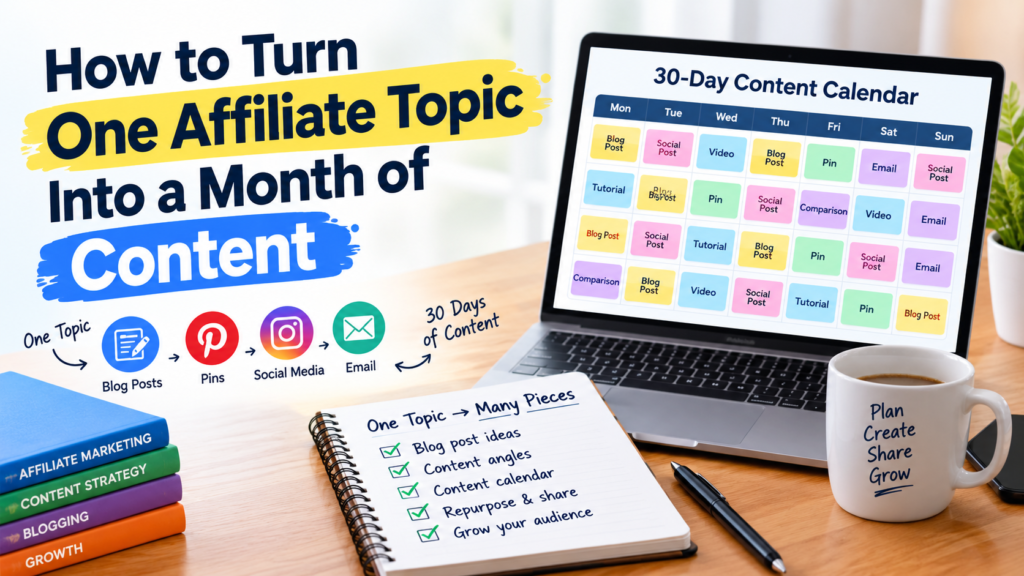
How to Turn One Affiliate Topic Into a Month of Content
The hardest part of affiliate marketing is often just showing up with something to publish. You’ve got a blog, Pinterest pins, a social account or two, and an email list waiting. After the first handful of articles, finding the next idea starts to feel like its own job.
You don’t need 30 unrelated topics. One well-chosen topic can feed several articles, a few tutorials, a comparison or two, and a pile of social posts. The trick is to come at it from different reader questions instead of rewording the same advice.
Say your topic is choosing an email marketing tool for a small business. You could write about free plans, mistakes beginners make, which features you actually need, how two popular tools compare, and how to set up a first campaign. Each piece answers a different question, and all of them point back to the same subject.
That gives you a content plan you can finish, gives readers a reason to click through to related posts, and creates natural spots to recommend a product without forcing it.
1. Start with a topic your audience needs
Pick a topic where a real reader problem overlaps with something you can explain well.
Don’t choose it just because the keyword is popular or because a dozen products pay commission. Choose it because someone is stuck and searching for an answer.
Here are a few topics that could work:
- Best budgeting apps for beginners
- Affordable website builders for small businesses
- Email marketing tools for new bloggers
- Social media scheduling tools for freelancers
- Equipment for setting up a home office
Any of these can spin off plenty of angles, but most are too broad for a new site. A brand-new blog won’t beat established review sites for “best website builders.” It has a better shot with something narrower, like affordable website builders for someone launching their first small business.
A narrow topic also hands you the questions to answer. How much does it cost per month? Can a beginner use it without hiring help? Which features matter, and which are just filler? What are the limits, and what else is worth a look?

Use three questions to evaluate your topic
Who is the reader?
Be as specific as you can. A beginner blogger with 12 subscribers needs different advice than a marketing agency managing client lists.
What problem are they trying to solve?
Find the decision, task, or frustration that brought them to the topic in the first place.
Can you actually help?
Ask whether you can explain the subject accurately, compare the options fairly, or walk someone through the steps. If a recommendation depends on hands-on use, don’t imply you’ve tested a tool you haven’t.
A strong topic sits where reader demand, your site’s focus, and what you can honestly cover all meet.
2. Break the main topic into smaller questions
Once you’ve picked a topic, turn it into the questions readers ask before, during, and after they choose a product. This is where one subject starts turning into a content plan.
Say your topic is email marketing tools for beginner bloggers. Readers might ask:
- Do I need an email tool when I’m just starting out?
- Are there free ones?
- Which features matter most?
- How do the main platforms compare?
- How do I build my first email list?
- What mistakes should I avoid?
- When is it worth paying?
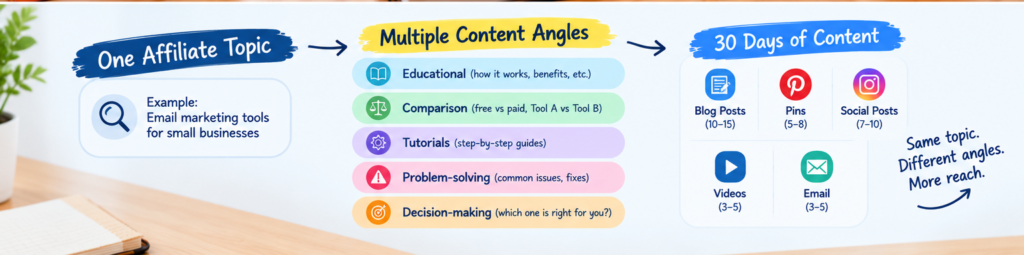
Some of these readers are still learning the basics. Others are comparing products or stuck on a specific task. Sorting the questions into five categories makes the gaps easier to see.
Educational content
explains the subject and lays out the options. Think how email marketing works, why bloggers build lists, and which features a beginner should understand.
Comparison content
helps readers weigh alternatives: free versus paid tools, one platform against another, basic features versus advanced ones.
Tutorials
show how to finish one task, like setting up a signup form, writing a welcome email, or connecting a form to your site.
Problem-solving content
tackles what goes wrong. Why is my signup form getting almost no signups? How often is too often to email? What should I check when messages never arrive?
Decision-making content
helps someone pick. Which tool suits a list of 200 people? Which paid features are worth the money? When has a free plan stopped being enough?
Working this way keeps you from publishing a month of near-identical listicles, and it shows you what’s missing before you start writing.
3. Research before you build the calendar
A long list of ideas only helps if those ideas match real questions and you can answer them properly.
Start with Google’s autocomplete suggestions, search results for your topic, customer questions, product documentation, and the communities where your readers hang out, like forums and subreddits.
If your site is already live, open Google Search Console and look at which queries are showing your pages in results. Some of those will point to questions you’ve only half answered.
Read competing articles too, but look for what they leave out instead of copying their headings. Maybe the information is outdated, confusing, or missing altogether.
For affiliate content, check product details on the provider’s own website. Confirm pricing, plan limits, key features, cancellation terms, and restrictions before they go into a comparison. Prices change, and a wrong number costs you trust.
For each idea, write down:
- The reader’s main question
- The specific answer your piece will give
- The sources you’ll need for factual claims
- The product, if any, that genuinely fits
- What your article adds that existing ones don’t
Notes like these make a content calendar far more useful than a list of titles pulled from thin air.
4. Turn the topic into different formats
With the questions in hand, pick formats that fit the information. You don’t need every format on every platform. Use the ones that help your audience understand something or take the next step.
Blog articles
suit explanations, comparisons, and detailed instructions. An article on choosing an email platform could cover must-have features, pricing, and when a free plan is enough.
Pinterest pins
work best for one focused tip, checklist, or tutorial step, with a clear takeaway and a link to the full page. A pin called “5 email features new bloggers should check” could link to the article that covers them. Don’t make several pins with the same promise and different wording. If you design more than one pin for a page, give each a different reason to click.
Short videos
can show one small task, like building a signup form or explaining the gap between two features. Keep them simple enough to follow in under a minute. A complicated process is better as a longer video or a written guide.
Email newsletters
can share a practical tip, flag a common mistake, or send subscribers to a fuller tutorial. One issue might argue that you should pick a tool for what you’ll use, not for the longest feature list.
Social media posts
can answer a single question, share a checklist, clear up a misconception, or ask readers to think through a decision.
Whatever the format, write for the people who’ll see it there. Pasting the full blog article into every channel rarely works, since each platform gives you a different amount of room and a different kind of reader.
5. Build a Practical 30-Day Affiliate Content Calendar
Let’s use the hypothetical topic email marketing tools for beginner bloggers to create a month-long plan.
The calendar below is a planning example, not a claim that these exact topics have verified search demand. Adjust the schedule to match your available time and the platforms your audience uses.
| Day | Content idea | Format |
| 1 | How Email Marketing Works for New Bloggers | Blog article |
| 2 | Five Features to Check Before Choosing a Tool | Pinterest pin |
| 3 | Three Reasons to Start an Email List Early | Social post |
| 4 | Free vs. Paid Email Marketing Tools | Blog article |
| 5 | How to Choose a Tool on a Small Budget | Pinterest pin |
| 6 | A Beginner’s Email Marketing Checklist | Social post |
| 7 | Weekly Lessons: What Beginners Should Know | Email newsletter |
| 8 | How to Create Your First Signup Form | Tutorial |
| 9 | Common Signup Form Mistakes | Pinterest pin |
| 10 | A Simple Welcome Email Structure | Social post |
| 11 | How to Write a Welcome Email | Blog tutorial |
| 12 | Five Questions to Ask Before Paying for a Tool | Pinterest pin |
| 13 | How to Compare Email Marketing Plans | Social post |
| 14 | Choosing Features Without Overspending | Email newsletter |
| 15 | A Comparison of Two Suitable Platforms | Comparison article |
| 16 | The Main Differences Between the Two Platforms | Pinterest pin |
| 17 | Which Features Matter Most to Beginners? | Social post |
| 18 | How to Organize Your First Subscriber List | Tutorial |
| 19 | A Simple Email List Setup Checklist | Pinterest pin |
| 20 | Mistakes to Avoid When Building an Email List | Blog article |
| 21 | Lessons From the Month’s Tutorials | Email newsletter |
| 22 | How to Review a Tool Before Recommending It | Blog article |
| 23 | What to Check Before Upgrading a Free Plan | Pinterest pin |
| 24 | How to Keep Email Marketing Costs Under Control | Social post |
| 25 | Questions to Ask Before Switching Platforms | Tutorial |
| 26 | A Beginner’s Email Marketing Glossary | Pinterest pin |
| 27 | How to Choose a Platform for Your Needs | Blog article |
| 28 | Frequently Asked Beginner Questions | Social post |
| 29 | A Summary of the Best Starting Resources | Email newsletter |
| 30 | Review Results and Plan the Next Topic | Planning and analysis |
This schedule contains several different content types, but it doesn’t require 30 full-length articles. Some days involve short posts, while others involve research or reviewing performance.
You can also publish less frequently. For a solo blogger, three substantial articles a month accompanied by a few useful supporting posts may be more realistic than publishing daily.
Consistency should fit your resources, not become a reason to publish content that hasn’t been checked.


6. Repurpose content without repeating yourself
Repurposing means reshaping an idea for a new format or a different reader need. It doesn’t mean pasting the same article onto several pages.
Start with one well-researched article and pull out its lessons, examples, and instructions. Then ask which parts could stand on their own. An article on choosing email marketing software might hold a pricing comparison, a feature checklist, a setup tutorial, and a list of common mistakes. Each of those can become its own resource if it answers a separate question.
Here’s a workflow that works:
- Pick the strongest ideas. Choose the parts of the article that give a clear answer or a practical payoff.
- Match each idea to a format. A checklist suits a Pinterest graphic, a demonstration suits a video, and a detailed explanation suits a blog post.
- Add what the format needs. A video can show the process on screen, while a blog post has room for exceptions and troubleshooting.
- Link to the right resource. Anyone who wants more detail should land on the relevant article without digging through unrelated pages.
- Check for overlap. If two planned pieces answer the same question, merge them or give each a clearly different job.
You get more out of your research this way, and you don’t end up with pages nobody needs.
7. Connect affiliate links to real reader needs
Affiliate content should help people decide. It shouldn’t squeeze a product recommendation into every piece.
An article explaining how email marketing works may not need an affiliate link at all. A comparison of email platforms probably will, and linking there feels natural because the reader is shopping.
Before you add a recommendation, ask whether the product solves the problem the article is about. Then be upfront about its weak spots. If the free plan is tight, setup takes some technical work, or a feature only comes with a pricier tier, say so before the reader signs up.
Don’t claim you’ve tested a product when you haven’t. You can still write a solid comparison from official documentation, clear criteria, and honest research. Just keep documented features separate from things you tried yourself.
Disclose affiliate relationships clearly
If you earn a commission on purchases, say so, and put the notice close to the recommendation or link. For example:
“Some links in this article are affiliate links. If you buy through them, we may earn a commission at no extra cost to you.”
The U.S. Federal Trade Commission says affiliate relationships must be disclosed clearly and conspicuously. Readers shouldn’t have to hunt through a general info page or click an obscure link to learn that a recommendation might earn you money. Requirements can differ by country and audience. See the FTC guidance on affiliate marketing disclosures.
8. Measure results and adjust next month’s plan
A content calendar is a starting point. It doesn’t promise that every idea will find readers.
At the end of the month, look at what happened. Google Search Console shows impressions, clicks, and queries for your site, and each social platform has its own analytics.
Don’t stop at total views. Ask whether people found what they came for and whether the right people showed up. A tutorial might attract visitors who want to finish a task, while a product comparison draws readers closer to buying. Judging both by the same number will mislead you.
Then decide what to do next:
- Lots of impressions, few clicks: Check whether the title and description match what the page delivers.
- Visitors arriving from relevant searches: Expand the sections that answer their questions, if more detail would help.
- One format getting a response: Make more in that format, as long as each piece adds something new.
- Little interest: Revisit the topic, the search intent, the presentation, and the quality before deciding to update or retire the page.
Try not to change several things at once, or you won’t know what moved the numbers. Give new pages time, too. A article published last week can’t tell you much yet.
Google’s guidance recommends helpful, original content over pages made mainly to game rankings. It also warns that using automation to churn out many pages without adding value can fall under its scaled-content-abuse policy. See Google’s people-first content guidance.
9. Common mistakes to avoid
Publishing similar articles just to fill the calendar.
Swapping a few words in a title doesn’t create a new opportunity. Each article should answer a different question or go to a different depth.
Picking topics only because affiliate products exist.
A topic with products attached isn’t automatically a good one. If readers need the basics first, teach them before pointing them to a purchase.
Stuffing posts with affiliate links.
Too many recommendations bury the information people came for. Add a link when it supports the point of the article.
Ignoring product changes.
Prices, features, free-plan limits, and terms shift. Check them before you publish and again from time to time, especially in comparison posts.
Spreading yourself across too many platforms.
A new blogger juggling a blog, Pinterest, Instagram, and YouTube will likely do all of them badly. Start with the formats you can keep up, then add more once your process feels steady.
Treating volume as the goal.
Thirty weak posts aren’t more useful than ten well-researched ones. Google doesn’t prescribe an ideal word count, so aim to answer the reader’s question fully instead of hitting an arbitrary target.
Frequently asked questions
Can one affiliate topic really fill a month of content?
Yes, if the topic holds enough distinct questions and you match them to suitable formats. A broad one can support educational articles, comparisons, tutorials, and short social posts. But not every topic stretches to 30 different pieces. If your ideas start repeating, pick a related topic or publish less often.
How many affiliate posts should I publish each month?
No number guarantees results. Base your schedule on how much time you have for research and writing, and on the standard you want to hold. A small site often does better with a few thorough articles plus some supporting content than with a daily grind.
Should I write a separate post for every keyword?
No. Related keywords often mean the same thing to the searcher and belong on one page. Write separate articles when the questions, the answers people want, or the tasks are truly different.
Can I reuse one blog article for Pinterest and social media?
Yes, but adapt it. Don’t copy the whole thing. A pin might highlight a checklist, and a social post might explain one mistake. Link back to the article when it has the extra detail you’re promising.
Does publishing more content improve Google rankings?
Not automatically. Google emphasizes useful, reliable, people-first content, not a set publishing frequency or word count. Rankings depend on many factors, and no calendar can promise a particular position.
Conclusion
Turning one affiliate topic into a month of content starts with knowing what readers need. From there you find the distinct questions, research the answers, pick formats that fit, and fold it all into a calendar you can actually follow.
Treat your main article as a source of ideas, not a template for dozens of near-copies. Give every supporting post its own purpose, check product details, disclose your affiliate links, and let the numbers guide what you do next.
You don’t need to publish daily to build a useful affiliate site. You need a process that lets you put out relevant content steadily without cutting corners on accuracy or losing readers’ trust.
Pick one topic, plan a realistic first week, and add more only when you have enough good ideas to justify it.